
Here are the answers to some frequently asked questions. Select a topic from the menu below to jump to that section.
NB. you may have to scroll down slightly if the header banner is obscuring the first few lines of text.
SOS MEMBERS’ GROUP EXHIBITIONS
- How do I enter work for an SOS Members’ Group Exhibition?
- Is there a paper form I can use instead of the online Entry Form?
- My payment won’t go through. Can I still enter work for the Exhibition?
- How many times can I enter?
- Is there a selection process?
- Why do I have to send you pictures of my work and where do I send them?
- When will I hear which of my pieces have been selected?
- When will I get my Artist Number and why can’t you just use my SOS Art Directory number?
- What are Artist Sales Sheets and when will I receive mine?
- Why are Artist Sales Sheets so complicated?
- Why is Stewarding a Condition of Entry? If I can’t Steward, can I still take part in the Exhibition?
- Can you arrange for someone to deliver/pick-up my work for me please?
- Why do you insist on using numbers instead of proper wall labels?
- If I make a sale, when will I get paid?
WEBSITE
- How do I edit my listing?
- How do I reduce the size of my images?
- I haven’t received the automated emails
SOS MEMBERS’ GROUP EXHIBITIONS
How do I enter work for an SOS Members’ Group Exhibition?
Keep an eye on the Members’ Newsletters.
Approximately seven weeks before the start date of an exhibition, a link will be included in an email which will take you to the Conditions of Entry document for that particular show. This document will contain all the information you need about the exhibition such as the deadline for entries, the entry fee and the commission charged, as well as a link to the online Entry form, a link for paying your entry fee and a link for signing up for stewarding (a Condition of Entry).
Key dates and times, plus the number of pieces that can be submitted and the maximum dimensions allowed, will also be detailed in this document.
Please make sure you read the Conditions of Entry thoroughly before completing the online entry form. Most of the questions you might have about the exhibition will be answered there. If, however, having carefully read through the document, you are still unsure about anything please email admin@suffolkopenstudios.org and your question will be forwarded to the exhibition organizers.
Please note: Any work brought to the gallery/venue on drop-off day that does not conform to the criteria specified in the Conditions of Entry will be turned away.
There are four steps to the entry process. All four must be completed to create a valid entry.
Step 1. Complete and submit the online entry form (keep a note of your answers in a text document in case of technical problems)
Step 2. Pay your Entry fee via the SOS shop.
Step 3. Sign up for stewarding. The number of stewarding shifts required will change from show to show so be sure to read the Conditions of Entry carefully.
Step 4. Send us photos of your submitted work as attachments to an email (admin@suffolkopenstudios.org).
You DO NOT need to be logged in to the SOS website to complete the four steps detailed above.
Exhibition organizers can easily see if any of the above steps have not been completed for your entry and remember, your entry is not valid until all four steps have been completed. Please don’t make them chase you as their lives are busy enough in the weeks before an exhibition. If you have any problems with the entry process please email us at admin@suffolkopenstudios.org.
Is there a paper form I can use instead of the online Entry Form?
No. The data collected by the online Exhibition Entry Form is downloaded as a spreadsheet when entries close. It is then sorted and mail-merged to create the printed Exhibition Catalogue. Paper forms would need to be typed into the spreadsheet by one of the exhibition team and there just isn’t time for that I’m afraid. If you are having problems with the online form, please reach out to us by emailing admin@suffolkopenstudios.org and someone will help you.
My payment won’t go through. Can I still enter work for the Exhibition?
Yes. In cases where the website fails to process your payment for your Entry Fee you will be able to pay by BACS on request (email admin@suffolkopenstudios.org for bank details). This can take up quite a bit of admin time for the volunteers, as someone will first have to log in to SumUp to make sure payment has indeed failed and will subsequently have to log in to our online banking system to check that the BACS payment has been received. So please try to use the online payment method first if you can. In very extreme cases we may be able to accept a cash payment at Drop-off but this is rare and is at the discretion of the exhibition organizer. Most problems with payment can be sorted out long before then if you contact us.
Work from artists who fail to pay for their Entry Fee altogether will not be shown.
How many times can I enter?
Once. We accept one entry only from each member per exhibition. However, the single entry form and associated fee can cover multiple items. See the Conditions of Entry document for the show in question to find out how many items you may submit.
You can enter up to three SOS Members’ Group Exhibitions every year.
Is there a Selection process?
No formal selection process takes place. Every artist who enters is guaranteed to have at least one piece shown as long as…
a) their work meets all criteria set out in the Conditions of Entry for that particular exhibition and
b) they have completed all four steps in the Entry process.
Please see the answer below for more details.
Why do I have to send you pictures of my work and where do I send them?
The exhibition organizers will normally ask you to send in photographs of the work submitted These do not have to be professional photographs – a clear phone photo will do. If you are entering a collection of small items, a photo of a representative selection of pieces will suffice.
These photographs will assist the organizers with the curation of the exhibition but all members are guaranteed to have at least one piece shown as long as it meets the criteria laid out in the Conditions of Entry. If the instructions for that exhibition allow you to enter multiple works, from which the organizers may select one or two pieces, the photos enable them to choose pieces that they feel will hang well together as a cohesive show. Please note: even if you have more than one piece selected there is no guarantee that your work will be hung together.
Photographs should be sent as email attachments to admin@suffolkopenstudios.org with the filenames in the following format:
[Name of artist]_[Title of artwork]_[Dimensions H x W]_[Price in whole pounds]
If the filenames of the images you send are not in the format described above the Exhibition Organizers will be unable to accept them and you will be asked to submit them again, appropriately named.
NB. We do not need photos of browser pieces or greetings cards.
When will I hear which of my pieces have been selected?
As soon as the deadline for entries has passed, the entry data is downloaded from the SOS website as a spreadsheet.
This is then sorted into alphabetical order using the artists’ names and exhibition-specific Artist Numbers are allocated. These numbers will be used to identify your work in the printed Exhibition Catalogue.
Once the exhibition organizers have decided which works they would like to include in the show, an email with a draft Exhibition Catalogue listing will be emailed to all exhibiting artists for checking.
Your Artist Number and the individual piece numbers for the main works submitted will be included in this list.
When will I get my Artist Number and why can’t you just use my SOS Art Directory number?
Artist Numbers are sent out in the draft Exhibition Catalogue listing emailed to all exhibitors a few days after entries close.
We did consider using SOS Art Directory numbers, and, If every member entered every exhibition, this would be possible. However, there is usually significant variation in the numbers of members entering each show – usually depending on the location and the time of year. This would mean many ‘gaps’ in the number sequence in the Catalogue which in turn could prove confusing to visitors. We do include your Directory number in the Exhibition Catalogue so that a link between the two booklets can be made and Exhibition Visitors are able to easily access your contact information more easily. Directory numbers are in a smaller font and in brackets after your name in the Exhibition Catalogue. How this would work is as follows:
- An exhibition visitor spots a painting they particularly like and are interested in finding out more about the artist.
- Using the number on the wall label they find the artwork and artist in question in the Exhibition Catalogue.
- Using the Directory number in brackets after the artist’s name, they can look them up in the Directory (either a print copy available at the exhibition or the downloadable PDF on the website) and find their contact details, website address etc.
What are Artists’ Sales Sheets and when will I receive mine?
Artist Sales Sheets will be emailed to all exhibitors once Artist Numbers have been allocated.
Each item that is for sale at an exhibition (including browser pieces and greetings cards) must be labelled clearly with your Artist Number and the number of the individual object (or piece number) as listed on your Artist Sales Sheet.
While the individual piece numbers of your main items will have been sent to you in the draft Catalogue listing, the identifying numbers of browser pieces and greetings cards will become apparent when you complete your Artist Sales Sheet.
Labeling items in this way ensures that artists receive the correct payment for any sales and also helps the hanging team place the correct wall label next to your main artwork(s).
Artist Sales Sheets are emailed to exhibiting artists a week or so before Drop-off
Please print your Artist Sales Sheet and complete it by hand. Do not sign it at this stage.
You should bring the completed Artist Sales Sheet with you on Drop-off day as stewards need it to check-in your artworks, browser pieces and greetings cards. Any sales you make will also be recorded on your Artist Sales Sheet. Any unsold works will be checked-out on your Artist Sales Sheet on Pick-up day. You will then be asked to sign the document to confirm you agree with the information recorded.
All work must be checked out. If you take your work without checking it out we may not be able to reimburse you for any discrepancies discovered later.
Why are the Artists’ Sales Sheets so complicated?
Artists’ Sales Sheets have to do a lot of heavy lifting.
Each Artists’ Sales Sheet contains all the information needed to track every item brought to an exhibition for sale by every participating artist.
They help us to:
- Know exactly what items have been left with us by an artist
- The number of sales an artist has made as well as the value of each sale (particularly important if a discount is applied).
- Offer a discount to a potential customer without having to track down the artist first
- Identify and resolve discrepancies by checking them against Daily Sales Sheets
- Calculate artist payments quickly and efficiently
- Contact an artist when necessary e.g. when a main item sells
Calculating artist payments, particularly when there are discrepancies, has in the past taken up a lot of volunteer time in the days immediately after an exhibition closes. As this large and complex task is usually carried out just one committee member, it was decided that the workload should be shared as much as possible with the exhibiting artists and exhibition stewards. This is what the Artists’ Sales Sheets are designed to do.
- Artists have only their own work to enter when completing their Artists’ Sales Sheet and several days in which to do so.
- Stewards often work in teams of three and frequently have times when they are not busy.
- At Drop-off and Pick-up there are dedicated teams to check work in and out.
Properly completed Artists’ Sales Sheets make the task of wrapping up an exhibition so much quicker and easier than it used to be – it also means that artists get paid for sales far more quickly.
To be fair, we don’t think Artists’ Sales Sheets are actually that complicated at all, even though they do have to capture a lot of information. The forms are divided into colour-coded sections that serve specific purposes and are for the use of specific volunteer roles at different times.
- White Sections: These are the parts of the form that artists should fill in before bringing their form to Drop-off.
- Green Sections: These are used by volunteers at drop-off to check-in work, browser pieces and greetings cards (tick-boxes).
- Grey Sections: These are used by exhibition stewards to record all sales during the course of an exhibition.
- Pink Sections: These are used by volunteers at pick-up to check-out work and investigate discrepancies.
Depending on your role, you only need to complete one of the colour-coded sections at any one time.
Here is a short video which shows how this works (we’ll be re-recording this soon as the forms have changed slightly but as they’ve actually got simpler, it should still be helpful).
Why is stewarding a Condition of Entry? I live too far away to come to Drop-off, Pick-up, the PV and do stewarding as well! Can I still submit work for the exhibition?
Each year the Committee does its best to organize exhibitions at different locations across the county in an attempt to ensure there is at least one that falls within easy travelling distance of all of our members. This is dependent on being able to find suitable venues. We rely on our members to alert us to locations near them that might be of interest for future shows. Unfortunately some of our members live in places that always seem to be some distance from whatever venue we choose.
In order to be as inclusive as possible, members who are experiencing genuine barriers to participation, such as significant health issues or full-time caring responsibilities, may apply to the exhibition organizers for a stewarding waiver. Once a waiver has been authorized, there is no need to re-apply for each exhibition unless the situation changes. Members should think carefully about the cumulative miles they might need to travel to fulfill the requirements of a particular exhibition before making the decision to enter as simply saying “It’s too far” will not result in a stewarding waiver being issued.
There are various ways in which to reduce the number of miles you will need to travel:
- Enter into a reciprocal arrangement with another exhibiting artist e.g. you take both sets of work to Drop-off and they cover Pick-up (or vice versa)
- Select a stewarding shift during Drop-off / Pick-up / PV
- Car share
- Quid pro quo – if you live close to one exhibition and can do multiple stewarding shifts, this could be offset (at the organizer’s discretion) against the stewarding requirement for another show. This is only possible, however, if all the stewarding slots for all shows can be covered. If there is going to be a shortfall in stewards, organizers may unfortunately be unable to honour such arrangements.
Can you arrange for someone to deliver/pick-up my work for me please?
No, sorry, Exhibition Organizers are far too busy to arrange this sort of thing for you. You will receive a draft Exhibition Catalogue when entries close so you will be able to see the names of all the other artists taking part. It will be up to you to contact them to ask them if they can help – their contact details are likely to be in the SOS Art Directory. You could also post an appeal for assistance on the SOS WhatsApp group and in the WhatsApp group set up specifically for that exhibition. If you are not a member of the SOS WhatsApp group please email your mobile number to admin@suffolkopenstudios.org.
Why do you insist on using numbers instead of proper wall labels?
Members are divided roughly 50:50 on whether using numbers plus a printed Exhibition Catalogue is a good idea or not.
Those that dislike it are unpersuaded by the argument that this is the “modern professional” way to do things, that it is becoming more common in galleries and exhibitions alike, and that it enables the viewer to connect with the work on a purely visual level before finding out who the artist is, the title, the price etc.
The delay between a visitor spotting an artwork they like and being able to get all of the above information from the Exhibition Catalogue is a few seconds at most and, in our opinion, does not constitute a significant barrier to purchase. We have also conducted straw polls on the popularity (or otherwise) of number wall labels at each of our exhibitions since we started using them and anecdotally we can say that most of the visitors we asked said that they liked them or at least weren’t bothered by them.
The only negative comment we received was from someone looking for the work of a particular artist, which they had found difficult, especially as our hangs are never in numerical order. However, they did find what they were looking for eventually, and it also meant that they had to look at the work of a lot of other artists first – a win-win as far as we’re concerned. Usually, if visitors know the artist or their work well, they can spot them without the wall labels anyway.
Our main reason for moving to numbered wall labels is purely a practical one, however. Individual, detailed wall labels, produced to a professional standard, used to take upwards of three days to make. This is a significant amount of volunteer time. All of our volunteers are busy people, and with sometimes as many as 90+ different artists taking part in some shows, it became an unfair burden. The numbered wall labels, on the other hand, though time-consuming to create in the first instance, can be re-used time and time again. Occasionally replacements need to be made, when the odd label is damaged for example, but this is a fairly quick and easy job. The Exhibition Catalogue can be created in half a day – the Entry Form data is downloaded from the website as a spreadsheet, which is then sorted and used as the database for a generic, pre-existing mail-merge document which is then copied and pasted into a generic and pre-existing In Design template that can then have the front cover and paid advertisements quickly added before being saved as a print-ready PDF and emailed to the printers. So, for now, the number wall labels are here to stay!
If I make a sale at an Exhibition, when will I get paid?
If you make a sale (or sales) at an exhibition, we aim to pay you by bank transfer within two weeks of the exhibition closing. There are a number of things that can slow this down, however.
- Depending on the amount of unallocated funds in the SOS bank account, we may have to wait for SumUp to transfer exhibition takings to us before we can pay out. This can sometimes take weeks.
- Artists’ payment details are stored in our Lloyds online Business banking system. If a payee’s details are not used for a few months, Lloyds has a habit of deleting them from the system. Unfortunately, for security reasons, we are unable to store bank details anywhere other than our online Business banking system, so we now ask those artists who have made sales to send their bank details to us after each exhibition.
- The treasurer is a practicing artist with their own business to run. Payments are therefore made in batches.
If an artist has made sales at an exhibition but fails to send us their bank details, we will send them a maximum of three reminder emails. After six months, any unclaimed exhibition revenue will be transferred into a pot of money put aside to enable Suffolk Open Studios to offer concessionary membership rates to artists on a low income.
WEBSITE
How do I edit my listing?
If you have submitted your listing but you have not completed all of the details, or added all of your images, or just want to change something, this can only be done once your payment has been received and your listing has been published. You will receive an email notifying you when this happens. Please check your spam box for emails as they may be sent there, due to their automated nature. Once that has happened you can get to your listing either by navigating through the directory for your area, or by going to view your SOS page and clicking on the Edit button next to your listing.
How do I reduce the size of my images?
If your images are too large to upload to the website (the maximum files size is 1Mb per image and the maximum image size is 1000 x 1000 pixels), you can use various programs to reduce the size. The simplest program to use is Microsoft Paint if you have this. Make sure you use a copy of your original file and then just use the File, Resize option and choose the pixels option, making the largest dimension equal to 1000 as shown below:
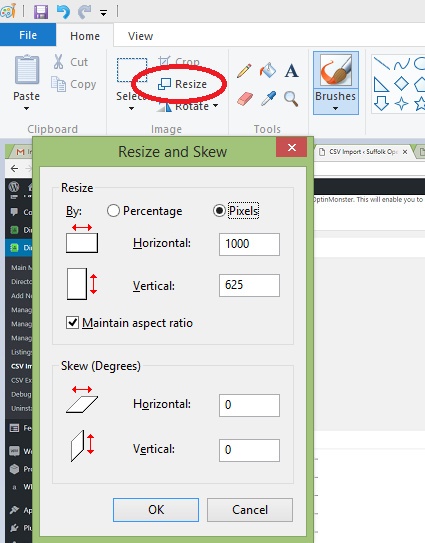
You can also use online facilities such as http://www.imagesmaller.com/ which enable you to do the same thing.
I haven’t received the automated emails
If you don’t receive the emails that are sent automatically when you register, create your listing and when your listing gets approved then please check your spam box as it is likely they have gone there. If you can’t find them please let us know via the contact form on the website.


You must be logged in to post a comment.